The API for structured visual content workflows

Turn structured data into ready-to-publish images and videos

VisualGrid applies templates, layout rules, and media composition logic to transform JSON payloads, product data, reviews, and media files into branded visual assets through one API.

POST /v1/render
{
  "template": "product_compare_v2",
  "data": {
    "product_a": {
      "name": "Pro Model",
      "specs": ["10hrs", "5G"],
      "image": "url_to_a"
    },
    "product_b": {
      "name": "Base Model",
      "specs": ["8hrs", "4G"],
      "image": "url_to_b"
    }
  },
  "outputs": ["1:1_img", "9:16_vid"]
}
1:1 Post
9:16 Story
16:9 Thumbnail
hub One payload → multiple assets

What teams build with it

From e-commerce to media to SaaS — teams use VisualGrid to automate visual content at scale.

Product Grids

Automatically arrange multi-product carousels from e-commerce catalogs.

Comparison Creatives

Generate feature-by-feature comparison assets for ad campaigns.

Review Videos

Turn text reviews into engaging 9:16 video clips with dynamic typography.

Avatar-Led Content

Combine audio scripts with visual layouts for AI avatar integrations.

Social Variants

Output 1:1, 4:5, 9:16, and 16:9 versions from a single content source.

Embedded SaaS Outputs

Provide native image export capabilities inside your own software product.

How it works

A simple pipeline from structured data to rendered media.

data_object

1. Input

Send a JSON payload containing product data, text copy, or media URLs. Map it directly to your existing CMS, database, or automation tool.

layers

2. Compose

The engine applies layout logic, templates, and dynamic resizing to construct the visual structure for each required aspect ratio.

movie

3. Render

VisualGrid generates final, high-quality images (PNG, WebP) and videos (MP4) ready for immediate publishing or distribution.

Real output, straight from the API

8similar uses VisualGrid to generate product roundup posts for social media — fully automated from their product catalog.
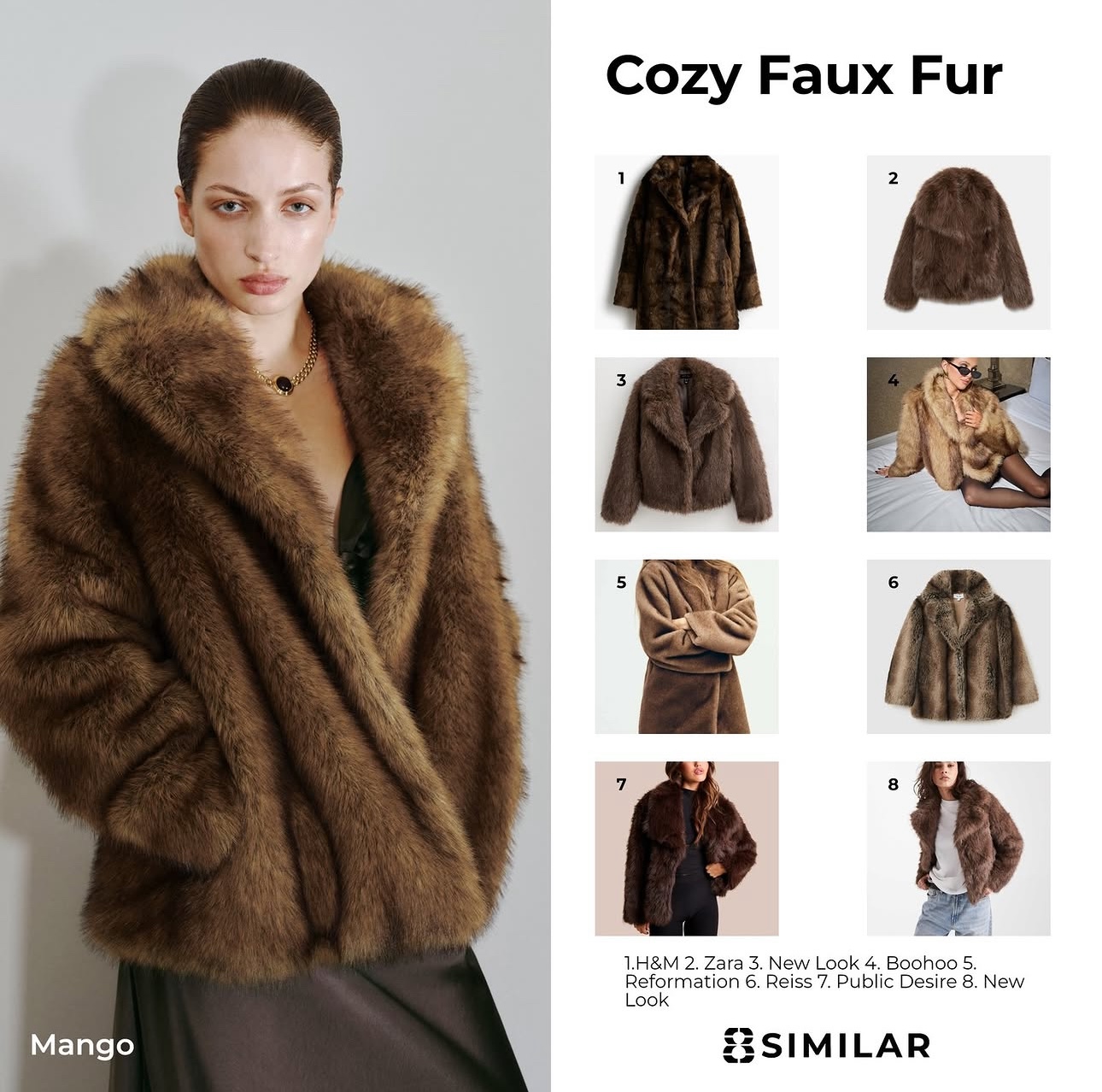
8similar Instagram post generated by VisualGrid — Cozy Faux Fur product roundup
data_object

Input

A JSON payload with a hero image URL, 8 product images, retailer credits, and post title.

layers

Template

The influencer-left template arranges the hero shot and numbered product grid with brand rules applied automatically.

movie

Output

A publish-ready 1:1 PNG for Instagram, plus 9:16 and 4:5 variants — all from the same payload.

From your data to every channel

VisualGrid sits between your data and your publishing destinations — one request triggers the full rendering pipeline.

Your Data
table Airtable / Sheets
database Supabase / Postgres
article CMS / PIM
webhook Webhooks
account_tree n8n workflow
code Direct API call
arrow_forward
hub VisualGrid Engine Render pipeline
arrow_forward
Published Assets
PNG Branded image posts
WebP Optimised web assets
MP4 Short-form video
Multi All ratios in one call
URL CDN-hosted, ready to use
Hook Webhook on completion
api

REST API

Single endpoint, versioned and stable

speed

Async queue

High-volume jobs processed without blocking

webhook

Webhook callbacks

Get notified the moment assets are ready

integration_instructions

SDKs

Node, Python, and Go clients available

Built for real publishing workflows

Not just an AI generator, but a deterministic engine for reliable production.

One payload, many outputs

Send data once and receive all the necessary aspect ratios and formats for a full multi-channel campaign.

Layout logic, not static templates

The engine understands content hierarchy, dynamically adjusting layouts when titles are long or images vary in size.

Media composition built in

Native support for layering, typography handling, safe-zones, and video timeline composition.

Built from real publishing workflows

Designed by teams who have managed high-volume social and ad operations, prioritizing reliability over hype.

Frequently Asked Questions

Everything you need to know about VisualGrid.

How is VisualGrid different from an AI image generator? expand_more

VisualGrid is a deterministic rendering engine, not a generative AI. You define templates with layout rules, and the engine applies your brand, data, and media to produce pixel-perfect, reproducible outputs every time. There's no randomness — the same input always produces the same asset.

What can I pass in a JSON payload? expand_more

Anything structured — product names, prices, review text, star ratings, media URLs, colour overrides, and more. The payload maps directly to named slots in your template. You can pull from a CMS, database, webhook, or Airtable and pipe it straight into the API.

What output formats and aspect ratios are supported? expand_more

Images export as PNG or WebP. Videos export as MP4 (H.264). A single request can render multiple aspect ratios simultaneously — 1:1, 4:5, 9:16, and 16:9 are all first-class. Safe zones are automatically applied per platform so your content is never clipped.

How do templates work? Can I build my own? expand_more

Templates define the layout grid, typography rules, layer order, and dynamic resize behaviour — not just static positioning. During early access, template creation is handled collaboratively — get in touch and we'll work with you directly.

How fast is a render? expand_more

Static image renders typically complete in under 2 seconds. Video renders depend on duration and complexity but are processed asynchronously via a job queue — you receive a webhook callback when the asset is ready.

When is VisualGrid launching publicly? expand_more

We're currently onboarding select teams in private beta. Request early access and we'll be in touch as soon as spots open up.

Early Access

Visual Grid is launching soon.

We're onboarding select teams before public launch. Get in touch to request early access or learn more about what's coming.

Request Early Access open_in_new